Generative AI can save time on writing, planning, research, brainstorming, data cleanup, and routine communication. It can also make mistakes with confidence. That mix of speed and uncertainty is why the best way to use AI at work is not to treat it as an automatic answer machine. Use it as a fast assistant whose output still needs judgment.

This guide shows a practical way to use generative AI safely in everyday work. You will learn what information is safe to share, how to write prompts that produce better results, how to check important claims, when human review is essential, and how to build a simple workflow that keeps AI useful without giving it more trust than it has earned.
What generative AI is good at in everyday work
Generative AI is strongest when a task has clear instructions, a known goal, and room for human review. It can summarize long notes, turn rough ideas into structured drafts, compare options, rewrite text for a different audience, suggest questions for a meeting, and create checklists from messy information.
Tools from OpenAI, Anthropic, Google Gemini, and Microsoft Copilot can all support common knowledge-work tasks. The exact features differ, but the same safe-use habits apply across platforms.
Good tasks to delegate first
Start with low-risk work where an error is easy to spot and easy to fix. Examples include creating an outline for a blog post, rewriting a meeting summary, generating ten headline ideas, turning a long email into a short reply, or grouping a list of customer comments into themes.
A useful test is simple: if the AI gives a wrong answer, can you notice the error before it causes harm? If the answer is yes, the task is often a good starting point. If the answer is no, the task needs stronger checks or should stay with a qualified person.
Separate low-risk tasks from high-risk decisions
Not every AI task deserves the same level of trust. A headline suggestion is different from a legal interpretation. A rough travel checklist is different from medical advice. A summary of public information is different from a decision that affects a person’s job, credit, health, or safety.
For routine work, AI can often produce the first draft. For high-impact work, treat AI as one input among several. Important decisions should use reliable source material and qualified human review.
A simple three-level risk test
Low risk: brainstorming, formatting, tone changes, non-sensitive checklists, and first drafts. These usually need normal review.
Medium risk: research summaries, customer-facing claims, technical instructions, financial calculations, and policy explanations. These need source checks and a second review.
High risk: legal conclusions, medical decisions, employment decisions, safety-critical instructions, confidential strategy, or actions that move money or change access. These should not rely on AI alone.
Do not paste sensitive information by default

One of the easiest mistakes is to copy private material into an AI tool because it makes the task faster. Before sharing anything, remove information that is not needed for the task. Names, customer records, passwords, private contracts, unpublished financial data, authentication codes, API keys, and internal credentials should stay out unless your organization has explicitly approved the tool and the use case.
Use the minimum-data rule
Ask yourself: what is the smallest amount of information the AI needs to help me? If you want help improving the tone of a customer email, replace the customer’s name, account number, and order ID with placeholders. If you want help analyzing a spreadsheet pattern, use a small anonymized sample instead of the full customer database.
For workplace use, follow your employer’s policy and the privacy controls of the service you use. The NIST AI Risk Management Framework is also a useful reference for organizations building more formal AI governance.
Write prompts that make mistakes easier to detect
A good prompt does more than ask for an answer. It defines the task, limits, output format, and evidence standard. This helps the AI produce something that is easier to review.
Use a four-part prompt structure
1. Goal: state what you want to achieve. For example, “Summarize these notes for a project manager who missed the meeting.”
2. Context: give only the background that changes the answer. For example, “The project is two weeks behind and the client asked for a revised launch date.”
3. Constraints: state what the AI must not invent. You can say, “Use only the facts in the notes. If a date is missing, say it is missing.”
4. Format: request a structure that is easy to check. For example, “Return decisions, owners, deadlines, open questions, and risks in separate sections.”
This method reduces vague output and makes missing facts more visible.
Ask the AI to show uncertainty
AI systems often produce smooth sentences even when the underlying answer is uncertain. You can reduce this problem by explicitly asking the model to separate known facts from assumptions.
Try instructions such as “Label every assumption,” “Do not guess missing figures,” “List the claims that need verification,” or “Tell me which parts depend on information that is not provided.” These instructions do not make AI perfect, but they make review faster.
Use confidence labels carefully
Do not treat a model’s self-reported confidence as proof. A confident-sounding answer can still be wrong. Confidence labels are useful only as a reminder to check uncertain areas. The real test is whether the claim can be supported by trustworthy evidence.
Verify facts with primary or authoritative sources

Verification is the most important habit in safe AI use. When an answer contains facts that matter, check them outside the model. The best source depends on the claim. Product specifications should come from the manufacturer. Laws should come from official government or legal sources. Scientific claims should be checked against reputable research or recognized institutions. Company policies should come from the company itself.
Use a claim-by-claim check
Instead of rereading an entire answer and thinking “this looks right,” identify the claims that could change a decision. Verify dates, prices, statistics, legal requirements, technical steps, names, product limits, and quotations. If a claim is not important, you may not need a deep check. If it could cause a wrong decision, verify it.
For public information, the U.S. Federal Trade Commission, government agencies, official documentation, and manufacturer support pages are often better sources than unsourced summaries.
Do not use AI-generated citations without checking them
AI can sometimes produce a title, author name, publication, or web link that looks real but is not. This is especially risky in academic, legal, technical, and business research.
Whenever AI gives you a citation, open the source yourself. Confirm that the page exists, that the author and title match, and that the source actually supports the claim. If you cannot find the source, do not include the citation.
A safer research workflow
First, ask AI to help identify the questions you need to research. Second, gather reliable sources yourself or through trusted search tools. Third, give the verified source material to the AI for summarization or comparison. Finally, check the finished output against the sources before you share it.
This source-first approach is safer than asking the model to invent a research trail from memory.
Use AI for drafts, not automatic publishing
AI can produce a strong first draft quickly. It can also miss context, repeat ideas, overstate certainty, or use a tone that does not fit your audience. A short human editing pass can fix many of these problems.
Use a five-minute review checklist
Check whether the answer is factually correct. Remove repetitive language. Confirm names and numbers. Rewrite sentences that sound generic. Add context only you know. Make sure the tone matches the reader. Then check whether any private information is still present.
For public content, also check whether the article adds original value. A useful post should solve a real problem, explain the steps clearly, and offer examples that a reader can apply.
Be careful with generated code and technical instructions
AI can help explain code, draft functions, find possible bugs, and create test cases. But generated code may contain security problems or use outdated methods. Never run unfamiliar code in production just because it looks clean.
Test in a safe environment
Use a development environment, staging site, test account, or sample data. Read the code before running it. Check dependencies. Confirm that destructive commands are not hidden inside a longer script. For security-sensitive changes, use peer review or a qualified developer.
If AI suggests a command that deletes files, resets a database, changes permissions, rotates keys, or alters firewall rules, stop and verify every part before execution.
Watch for automation bias
Automation bias happens when people trust a computer-generated recommendation because it is fast, detailed, or presented neatly. A long answer can feel more reliable than a short one even when both are wrong.
To avoid this, compare important AI output with your own knowledge, another source, or a second method. If an AI-generated calculation matters, recalculate it independently. If an AI summary changes a business decision, read the key original material yourself.
Use the “challenge the answer” step
After receiving an answer, ask: “What could make this wrong?” Then ask the model to identify weak assumptions, missing information, and alternative explanations. This turns the AI from a single-answer generator into a tool for examining the problem from more than one angle.
Create repeatable AI workflows instead of random prompting
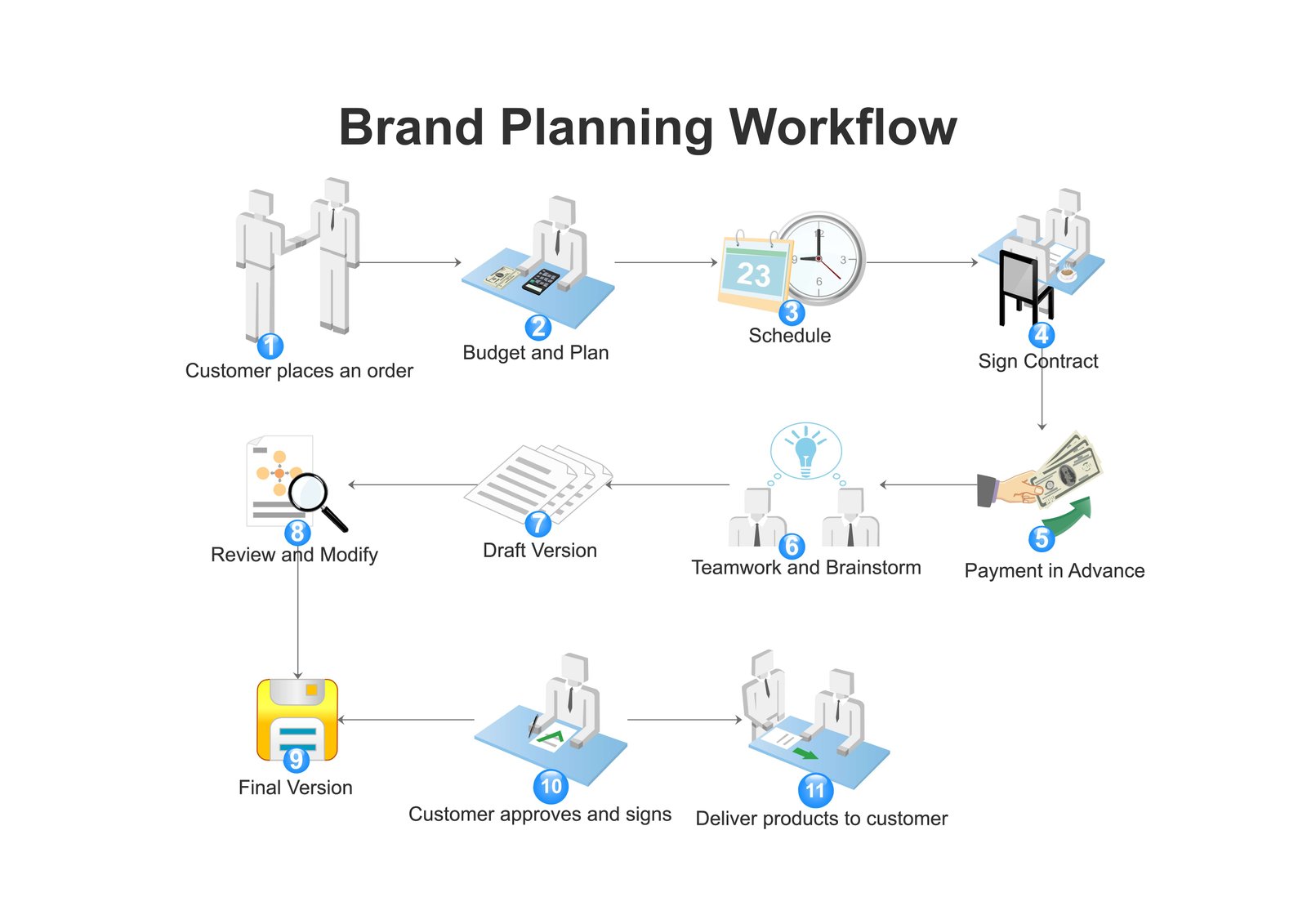
A repeatable workflow is easier to audit than a series of ad-hoc prompts. For example, a marketing team could use AI to turn call notes into a draft brief. The process might be: remove personal data, upload only approved notes, request a structured summary, verify numbers, add human context, and then publish the final brief.
Example: preparing a client update
Imagine you have messy notes from a weekly project meeting. First, delete account credentials and unrelated personal details. Next, ask the AI to create sections for completed work, blockers, next steps, owners, and deadlines. Then compare each deadline with the original notes. Finally, rewrite any vague sentence and send the update only after human review.
The AI saves time, but the human still owns accuracy.
Keep an audit trail for important work
For low-risk personal tasks, you may not need a formal record. For important business work, it helps to keep the original source, the final approved output, and notes about major changes. This makes it easier to understand where a mistake came from and to improve the workflow later.
Document the role of AI
In a team, clarify whether AI was used for drafting, summarizing, translation, coding, or decision support. This is especially useful when multiple people review the same work. The goal is not paperwork for its own sake. It is accountability.
Know when to stop using AI
Sometimes the fastest safe choice is to stop prompting and use a human expert or primary source. Do this when the task involves high stakes, the model keeps contradicting itself, the source material is missing, the answer depends on private context you cannot share, or you cannot independently verify the result.
AI is most useful when it reduces effort without removing responsibility.
A practical generative AI safety checklist
Before you use AI, define the task and its risk level. Remove information the model does not need. Give clear instructions and tell it not to guess. Ask it to identify assumptions. Verify important facts with authoritative sources. Review all public or customer-facing content. Test code away from production. Keep humans responsible for high-impact decisions.
If you follow those steps consistently, AI becomes easier to use well because you are building checks into the process rather than trying to spot every possible mistake afterward.
Conclusion
Safe generative AI use is not about avoiding the technology. It is about using it for the right tasks, with the right amount of data, and with the right review process. Start with low-risk work. Keep sensitive information out unless the environment is approved. Ask for structured outputs. Verify important claims. Treat AI-generated citations and code as untrusted until checked. Most importantly, keep a human responsible for the final decision.
A practical rule is enough for most everyday work: let AI increase your speed, but never let speed replace verification.